Key Takeaways
- Integration is not a post-go-live activity, it is a go-live requirement. A CRM that does not connect to your ERP creates a reconciliation problem that grows with every transaction.
- The CRM-to-ERP integration is the highest-value and highest-risk integration in any real estate CRM deployment. Proven middleware and tested patterns are essential.
- Property-xRM has proven integrations with Oracle EBS, Oracle Fusion, SAP, Microsoft Business Central, and Microsoft D365 Finance; across production deployments, not proof of concepts.
- Portal integration without bidirectional availability sync creates a double-booking risk. Unit status must update on the portal the moment a reservation is made in the CRM.
- Data migration from a legacy CRM is the single most underestimated integration workstream and the one most likely to undermine go-live confidence if it is treated as a technical task rather than a business programme.
Why Integration is not a Technical afterthought
A real estate enterprise that has selected a CRM platform and is now in integration planning is at the most consequential stage of the entire project. The platform selection decision is reversible but expensive. The integration architecture decision is not. The data flows, the middleware patterns, and the synchronisation logic built during integration planning will shape how every department works for the next five to ten years.
Integration is where CRM implementations succeed or fail at scale. A Dynamics 365 CRM deployment that is not connected to the ERP creates a reconciliation problem that begins on day one and grows with every transaction. A CRM that is not connected to the property portals creates a double-booking risk the moment inventory goes live. A CRM without an e-signature integration means every contract execution involves a manual step that introduces delay, version risk, and an audit gap.
This article maps the six integration domains that a mature real estate enterprise needs to address, covers the ERP integrations in detail, including Oracle EBS, Oracle Fusion, SAP, Microsoft Business Central, and D365 Finance and addresses the data migration workstream that most IT Directors underestimate until it is too late.
The Real Estate CRM Integration Map
No two real estate enterprises have the same integration map. The six domains below are the ones that recur most often across GCC and APAC deployments, but the specific systems within each domain, and how many of the six apply, depend on the developer or property manager’s existing technology stack, market, and operating model. A single-project residential developer may need only ERP and portal integration at launch. An enterprise managing sales, leasing, and facilities management across multiple countries will likely need all six.
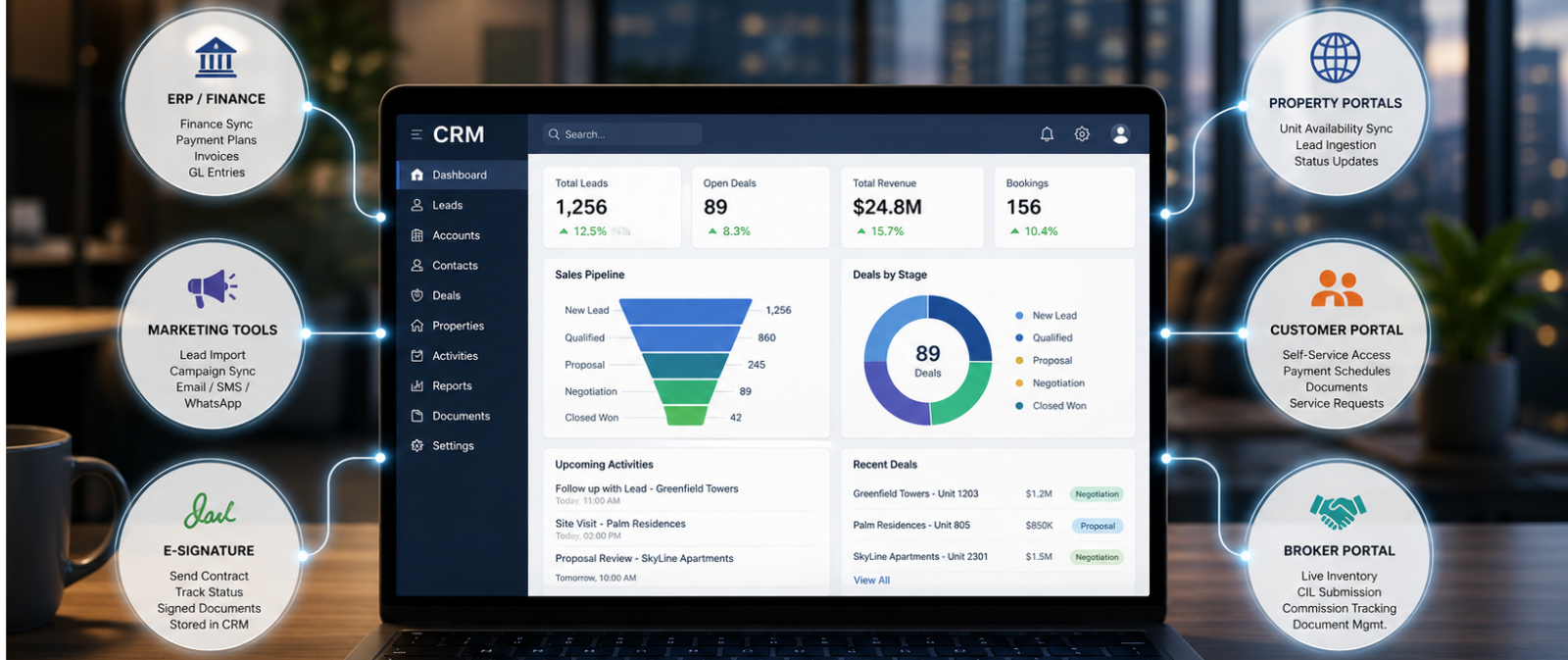
Property-xRM on Microsoft Dynamics 365 sits at the centre of a real estate technology ecosystem that typically spans six distinct integration domains. The diagram below shows what connects to what data flows in each direction.
| THE REAL ESTATE CRM INTEGRATION MAP; PROPERTY-xRM AT THE CENTRE |
| ERP / Finance Payment plan → invoice. Booking → GL entry. AR sync in real time. ↔ Property Portals Unit availability push. Lead ingestion. Status sync (available/reserved). ↔ Marketing Tools Lead ingestion from campaigns. Journey sync. Email/SMS/WhatsApp triggers. ↔ E-Signature Contract sent from CRM. Signed status returned. Document stored on record. |
| PROPERTY-xRM · Microsoft Dynamics 365 Unified data layer · Single customer record · Full audit trail · Real-time sync |
| Customer Portal Buyer/tenant self-service: unit status, payment schedule, documents, service requests. ↔ Broker Portal Live inventory access. CIL submission. Commission tracking. Document management. |
| Six integration domains. One central data layer. Every connection proven across 100+ real estate enterprise deployments. |
Each of these six domains represents a different type of integration problem. ERP integration is a transactional sync problem; high frequency, low latency, and financial accuracy required. Portal integration is a bidirectional availability problem; unit status must always be current in both systems. Marketing integration is a lead ingestion and campaign attribution problem. E-signature is a document lifecycle problem. Customer and broker portals are self-service access problems. Each requires a different approach and each has a different risk profile if it is not handled correctly.
What connects the six Domains
Before going through each integration domain individually, it is worth naming what they all have in common. Every one of the six integration domains exists to keep the same handful of records consistent everywhere they appear. The unit record. The customer record. The deal or tenancy record. A unit reserved in Property-xRM is the same unit that must show as unavailable on the property portal, the same unit a broker sees in the Broker Portal, the same unit that generates a payment plan in the ERP, and the same unit a buyer tracks in the customer portal.
Every integration failure described in this article, the double-booked unit, the reconciliation gap between CRM and finance, the broker who submits a Client Introduction Letter for a unit that was reserved two hours earlier, is the same underlying problem appearing in a different domain. One system has a version of the record that another system does not yet have. The fix is also the same in every case: the unit, customer, and deal records live once in Property-xRM, and every connected system reads from or writes to that single source rather than maintaining its own copy.
CRM to ERP Integration is the most important connection in Real Estate
The CRM to ERP integration is where the commercial record meets the financial record. When a buyer reserves a unit in Property-xRM, a financial obligation is created. A payment plan is structured, a Sale and Purchase Agreement (SPA) is issued, and a series of future instalments are committed. None of that has any value to the finance team until it appears in the ERP as an accounts receivable entry, a revenue recognition event, and eventually a general ledger (GL) posting.
Without reliable CRM to ERP integration, the finance team reconciles bookings against invoices manually, usually at month-end, usually from exported spreadsheets, and usually with discrepancies that take days to resolve. The ERP becomes a lagging picture of the financial position rather than a real-time one. Cashflow forecasting degrades. Collections teams work without visibility of whether the CRM payment plan and the ERP billing schedule are aligned.
The table below covers the five ERP systems most deployed in GCC real estate enterprises and how Property-xRM integrates with each. This is not an exhaustive list. Other ERPs, including NetSuite and regional finance platforms, are also encountered, and the right integration approach in every case depends on the specific ERP version and the buyer’s existing middleware investments, not a generic playbook.
| ERP System | Integration approach | Key data flows | Metadata status |
| Oracle EBS | KingswaySoft / REST API with middleware orchestration | Payment plan → AR invoice; booking confirmation → GL journal; receipt → CRM payment status | Proven across multiple GCC enterprise deployments |
| Oracle Fusion | REST API via Power Automate or Azure Integration Services | Real-time financial event sync; bidirectional payment status; customer account matching | Implemented for mixed-use developers on Oracle Cloud infrastructure |
| SAP S/4HANA | SAP BTP / RFC adapters via KingswaySoft or custom middleware | Contract value → SAP revenue; payment milestones → AR billing; vendor costs → FM work orders | Proven integration pattern; SAP BAPI-based for legacy deployments |
| Microsoft Business Central | Native Dataverse connector — lowest integration complexity | Near-native sync: sales orders, invoices, payment journals; built-in D365 CE to BC bridge available | Lowest-risk ERP integration for Microsoft-stack buyers |
| Microsoft D365 Finance | Native dual-write or Finance connector via Power Platform | Real-time bidirectional sync: sales bookings → revenue recognition; payment plans → AR schedules | Recommended path for full Microsoft stack deployments |
Questions to ask any vendor before assuming ERP integration is covered
- Have you integrated with this specific ERP version in a production environment or is this a proposed approach?
- What middleware do you use and is that middleware licenced, supported, and part of the project scope?
- How is integration tested: point-to-point connectivity only, or against realistic transaction volumes in UAT?
- Who maintains the integration when the ERP is upgraded and how is version compatibility managed?
- What monitoring is in place to detect and alert on integration failures before they affect business operations?
Portal and Listing Service Integration
In the GCC real estate market, property portals are primary lead generation channels for residential developers. A developer with active listings across multiple portals faces a specific operational risk if those portals are not integrated with the CRM: unit availability on the portal does not reflect the live inventory status in the CRM.
A unit that has been reserved in Property-xRM continues to appear as available on the portal until a manual update is made. In a busy sales period, that manual update may be delayed by hours. In those hours, additional buyer enquiries arrive for a unit that is no longer available. The sales team handles those calls, raises expectations, and then disappoints buyers. The downstream effect, on buyer trust, on sales team workload, and on portal lead quality compounds at scale.
The correct model is bidirectional integration: unit status in Property-xRM drives portal listing status in real time. When a unit moves to Reserved, the portal marks it unavailable. When a reservation falls through and the unit returns to Available, the portal updates automatically. Leads generated by the portal arrive directly in the CRM as a structured record, with source attribution tracked.
What portal integration covers
- Unit availability push: live unit status available, reserved, sold; synchronised to portal listings in real time or near-real-time
- Lead ingestion: portal enquiries captured directly in the CRM as a new lead record with source, campaign, and portal attribution
- Unit detail sync: price, area, floor plan, and availability data maintained in Property-xRM and pushed to portals, eliminating manual updates
- Status compliance: reserved and sold units removed from active listings automatically reducing compliance risk and buyer disappointment
Marketing and Communication Tool Integration
The buyer journey in real estate spans months. Over that period, the developer communicates with the buyer through multiple channels; email campaigns, contract documents, payment reminders, construction updates, and handover notifications. Each of these communications, if managed outside the CRM, creates a gap in the buyer record and a manual step in the process.
Property-xRM integrates with the tools that manage each communication type, removing the manual step and ensuring every communication is tracked against the buyer’s CRM record.
CRM → Marketing
Lead synced to campaign audience → Engagement score returned to CRM → Unsubscribe honoured in CRM
CRM → Buyer
Booking confirmation automated → Payment reminder at milestone → Handover notification triggered
CRM ↔ DocuSign
Contract sent from CRM record → Signed status auto-returned → Executed doc stored on record
CRM ↔ Adobe Sign
SPA and addenda sent digitally → Audit trail maintained in CRM → Multiple signer workflows supported
The WhatsApp and SMS integration deserves specific mention for the GCC market. WhatsApp is the primary communication channel for buyer-developer interactions in the UAE and wider GCC more so than email. An automated WhatsApp notification triggered by a CRM event (booking confirmed, payment due, handover scheduled) reduces inbound call volume, accelerates response, and creates a documented communication record in the CRM that email-only communication cannot provide.
Broker Portal Integration
Broker referrals account for 35–45% of qualified leads in most GCC residential markets. Managing that channel through WhatsApp groups, email chains, and manual commission spreadsheets creates the same fragmentation problem as managing any other integration point outside the CRM: it works at low volume and breaks at scale.
Property-xRM’s Broker Portal is built directly on the CRM data layer, not as a standalone tool that connects to the CRM via API. This distinction matters operationally. A broker accessing the portal sees live unit availability from the same inventory module that the internal sales team uses. A Client Introduction Letter (CIL), the document a broker submits to register a buyer lead, is immediately linked to the broker record, the unit, and the lead in the CRM when submitted through the portal. Commission calculations are based on the same transaction data that drives the finance integration.
What the Broker Portal covers
- Live inventory access: brokers see real-time unit availability, pricing, and floor plans, the same data the sales team uses
- CIL submission and tracking: Client Introduction Letters submitted digitally through the portal, linked to the CRM record and approved or rejected with audit trail
- Commission transparency: brokers can see their commission status per deal; approved, pending, paid, reducing disputes and inbound queries
- Document management: brochures, floor plans, unit specifications, and reservation forms accessible to brokers without requiring sales team intervention
- Notification and communication: automated updates to brokers when their CIL is approved, when a unit status changes, or when a commission payment is processed
Why broker portal built outside the CRM create fragmentation
A standalone broker portal that connects to the CRM via nightly sync or manual import has the same problem as any disconnected system: the data is always slightly wrong. A broker who sees a unit as available that was reserved two hours ago will submit a CIL for a unit that cannot be allocated, creating a dispute the sales team must resolve manually. Real-time integration, not scheduled sync, is the only model that works at broker network scale.
Data Migration is the Integration nobody plans for
Every enterprise CRM implementation involves a data migration from whatever came before, a legacy CRM, a collection of spreadsheets, a property management system, or some combination of all three. Data migration is technically an integration workstream; it is the one-time import of historical data into the new system but it is consistently treated as a lower priority than the live integrations described above.
The consequences of underplanning data migration surface at the worst possible time: go-live. A sales team that opens the new CRM on day one and cannot find their historical customer records, cannot see their previous unit transactions, or discovers that unit ownership data is missing or incorrect, immediately loses confidence in the system. That lost confidence is extremely difficult to recover and it is entirely preventable.
| Migration workstream | Common failure mode | What good practice looks like |
| Data audit | Vendor goes straight to extraction without auditing source data quality | Field-by-field mapping across all source systems before any migration script is written. Data quality issues documented and resolved. |
| Data cleansing | Duplicate records, inconsistent naming, and missing fields imported as-is into the new system | Dedicated cleansing workstream before migration. Deduplication, standardisation, and gap-filling completed against defined data quality criteria. |
| Migration dry-runs | First migration attempted in production, errors surface after go-live | Minimum three dry-runs in a UAT environment. Business owners validate migrated data against known records before sign-off. |
| Relationship mapping | Flat data migrated without preserving entity relationships; unit links to customer, broker, contract broken | Entity relationship mapping verified in UAT. Unit → project, customer → contract, broker → CIL relationships intact and queryable post-migration. |
| Data governance | No entry standards defined at go-live; data quality degrades within 90 days | Data entry standards, ownership rules, and validation logic defined and configured in the system before go-live. Not left for the training phase. |
The most important principle in real estate data migration is treating it as a business programme, not a technical task. The IT team can write the migration scripts. Only the business team can validate whether the migrated data accurately represents the historical commercial record. That validation requires dedicated time, structured test cases, and formal sign-off, not a quick review on the morning of go-live.
Data migration questions to ask before contracting an implementation partner
- Do you start with a formal data audit of all source systems or do you go straight to extraction?
- Is data cleansing a separate, tracked workstream in your project plan with its own timeline and sign-off gate?
- How many migration dry-runs do you conduct before go-live, and who validates each one?
- How do you handle entity relationships in the migration; unit-to-project, customer-to-contract, broker-to-CIL?
- What data governance framework do you configure in the system before go-live to prevent quality from degrading post-migration?
Integration is the Architecture decision that lasts
A real estate CRM that is not integrated is not an enterprise system. It is a departmental tool with an enterprise price tag. The integrations described in this article are not optional enhancements for a later phase. They are the architecture decisions that determine whether the CRM delivers value across the whole business or only within the sales team. And as the earlier section on what connects the six domains sets out, every one of these decisions comes back to the same underlying discipline: keep the unit, customer, and deal records authoritative in one place, and let every connected system read from that single source.
The IT Director or CTO reading this article is likely already asking the right questions: how does this connect to our SAP? What does portal integration look like? Who maintains integration when the ERP upgrades? These are the questions that separate partners with proven integration experience from those with an integration slide in their pitch deck.
Metadata Technologies has delivered every integration in this article in production – Oracle EBS, Oracle Fusion, SAP, Microsoft Business Central, D365 Finance, Bayut, Property Finder, DocuSign, Adobe Sign, and broker portals across 100+ real estate enterprise deployments in 12+ countries. Every integration claim in this article is backed by a live deployment.
Related reading: Microsoft Dynamics 365 for Real Estate: What Each Module Actually Does for the platform foundation that underpins every integration in this article.
Talk to a team with proven integrations across Oracle EBS, SAP, Microsoft Business Central, and the region’s leading property portals. Every integration described in this article has been delivered in production, not proposed on a slide.
FAQ
How does CRM integrate with ERP in real estate?
CRM-to-ERP integration in real estate synchronises the commercial record in the CRM with the financial record in the ERP. When a unit is reserved in the CRM, a payment plan is created and the ERP generates the corresponding accounts receivable entries. When a payment is received in the ERP, the CRM payment plan updates automatically. This bidirectional sync eliminates manual reconciliation, ensures finance teams work from live data, and prevents the booking-invoice gap that is endemic in disconnected systems.
Can Dynamics 365 integrate with SAP for real estate?
Yes. Microsoft Dynamics 365 integrates with SAP S/4HANA and SAP ECC through middleware adapters typically KingswaySoft, SAP BTP, or Azure Integration Services. The integration handles contract value to SAP revenue recognition, payment milestone triggers to SAP AR billing, and FM work order costs to SAP procurement. Metadata Technologies has delivered this integration in production environments for GCC real estate enterprises. Named-system integration experience is a critical differentiator to verify during partner selection.
How do you connect a CRM to a property portal?
CRM-to-portal integration works in two directions: outbound (unit availability, pricing, and status pushed from the CRM to the portal in real time) and inbound (leads generated by the portal ingested into the CRM as structured records with source attribution). The critical requirement is real-time availability sync, a reserved unit must be marked unavailable on the portal the moment the reservation is made in the CRM. Scheduled batch sync, even hourly, creates double-booking risk in high-demand periods.
What marketing tools integrate with real estate CRM?
Property-xRM integrates with Microsoft Dynamics 365 Customer Insights (Marketing) for email campaign management and customer journeys, DocuSign and Adobe Sign for digital contract execution, and WhatsApp and SMS platforms for automated buyer communications. Each integration removes a manual step in the buyer journey and ensures every communication is tracked against the customer’s CRM record. In the GCC market, WhatsApp integration is particularly high-value, it is the primary buyer-developer communication channel for most residential developers.
How do you migrate real estate client data from an old CRM to a new one?
Real estate CRM data migration requires five structured workstreams: a formal data audit of all source systems, a data cleansing programme before migration begins, the development and validation of field-to-field mapping documentation, multiple migration dry-runs in UAT with business owner sign-off, and the configuration of data governance rules in the new system before go-live. The most common failure mode is treating migration as a technical task rather than a business programme, validation by business owners, not IT, is the critical step.
What is the difference between CRM and ERP in real estate?
CRM manages customer-facing operations: leads, sales, leasing, service, and broker relationships. ERP manages financial operations: accounts receivable, general ledger, invoicing, and procurement. In a well-architected real estate enterprise, the CRM captures the commercial record and the ERP processes the financial consequence the two are integrated and complementary. Property-xRM bridges both through proven ERP integrations with Oracle EBS, SAP, Microsoft Business Central, and D365 Finance.

 Apr 19, 2022