Key Takeaways
- Integration design that covers only successful scenarios is incomplete. A duplicate booking, a frozen accounting period during month-end, and a silent notification failure are not edge cases. They happen at every active launch.
- There are two distinct failure categories with different owners: implementation failures (integration team) and business-process failures (operations team). Mixing them up delays resolution.
- Operational monitoring is not optional. A failed handover notification is not just a missed email. It is an owner who was never told their unit was ready, blaming the developer for a delay that was an integration failure.
- Data migration is the integration workstream most consistently underestimated, particularly the project to property to unit hierarchy and years of payment and commission history that must map cleanly into the new system.
Where Integration Projects Fail
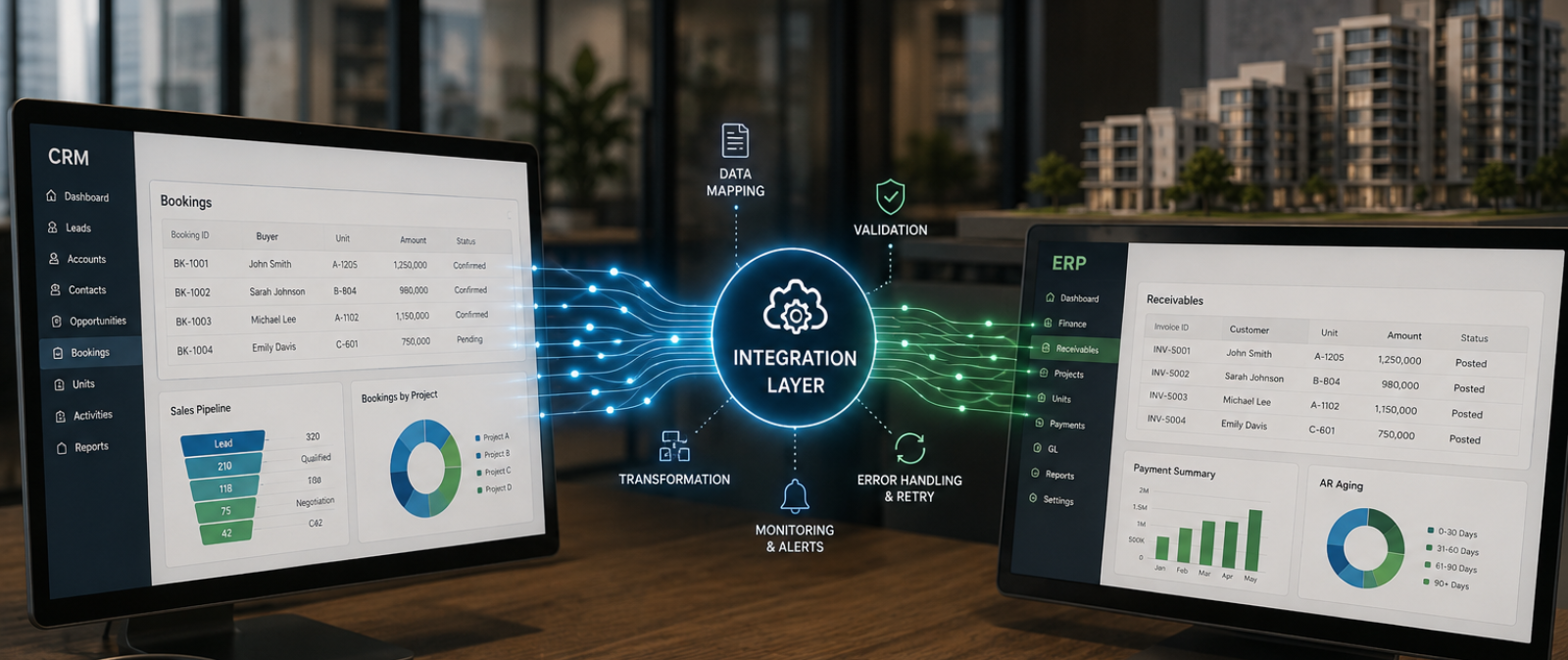
A real estate CRM integration can pass every technical connectivity test and still fail in production. The connection between systems is live. Data is flowing. Then finance closes the accounting period mid-launch, and every payment generated during the freeze window queues up silently. Nobody is alerted. On the first day the books reopen, someone in finance manually re-keys forty payment postings because there was no way to reprocess them automatically.
This is the integration process failure pattern. Not a connectivity problem. A design that assumed everything would succeed and made no provision for the operational reality of how a launch runs: bookings spike, units get re-released after a failed reservation, construction milestones lag sales, and the accounting calendar does not pause for any of it. Most integration design conversations focus on the happy path. The conversations that need equal attention are what happens when a transaction fails, who finds out, how it is retried, and how both systems confirm they are eventually consistent.
Two failure categories: Different cause, different Owner
Not all integration failures originate from the same source. The distinction matters because assigning the wrong team to fix the wrong type of failure wastes time and extends the disruption, particularly during a live launch when every hour of delay compounds.
| Failure type | Example | Who owns the fix |
| Implementation failure | The handover date field on a unit record is mapped to the wrong field in the facilities management system, so every unit that moves to “ready for handover” fails to trigger a snagging inspection task | Integration team. This is a technical mapping defect that must be corrected in configuration. |
| Business-process failure | A payment milestone tied to “70% construction complete” cannot post to the ERP because the project team has not yet updated the construction percentage for that reporting period | Operations team. The transaction is correct. The business condition behind it has not happened yet, and the project team must update the milestone before the retry can succeed. |
Both categories must be anticipated during integration design. An implementation failure requires a code fix or configuration change. A business-process failure requires the operations or project team to resolve the blocking condition, in this case updating the construction percentage, and then trigger a retry. An integration designed to handle only one type will accumulate unresolved failures of the other until they surface as a financial discrepancy at month-end close.
| How does your current integration handle a frozen accounting period mid-launch? Metadata’s integration approach for real estate CRM deployments includes structured exception handling for both failure categories, with configurable retry logic and escalation paths built around the real estate sales and finance calendar. |
Duplicate prevention must be Built in from the start
The most common duplicate trigger in real estate CRM is not a data entry mistake. It is the normal lifecycle of a unit during an active launch: a unit is reserved, the buyer’s financing falls through, the unit is re-released, and a different buyer books it within the same week. Without unique identifier validation across both systems, this sequence can generate two active payment plans against one unit or push two separate commission claims to the ERP for the same sale, each from a different broker firm.
The correct approach is prevention at entry. Both the source and target systems must maintain unique identifiers for every transaction type: reservation records, payment plan entries, contract references, and broker commission submissions. The integration layer must validate those identifiers in the target before pushing any record. A transaction with a matching identifier already in the target should be quarantined for review, not pushed again. By the time a duplicate commission claim is detected, it may already be queued for payout, which means correction requires coordinated action across live financial records and an uncomfortable conversation with two broker firms who both believe they earned the sale.
Retry, Monitoring, and Reconciliation
Retry and reprocessing
The scenario that breaks most real estate integrations is month-end. Finance freezes the general ledger for closing while the sales team is still actively reserving units and posting payment receipts for an active launch. Every transaction generated during that freezing window queues up, and without a retry mechanism, the only way to recover is manual re-entry once the books reopen, which at launch volumes can mean dozens of payment postings re-keyed by hand.
The integration should support automatic retry with configurable intervals and a maximum retry count before escalating to manual review. When the blocking condition clears, typically when finance reopens the period, the system should reprocess the queued transactions automatically or through a controlled batch mechanism, rather than requiring someone to locate and resubmit each one individually.
Transaction Blocked
GL is frozen for month-end close while new receipts and bookings keep arriving.
Automatic Retry
System retries at set intervals, up to a maximum attempt count, before flagging for review.
Batch Reprocessing
Once the period reopens, all queued transactions are reprocessed automatically.
CRM & ERP Confirmed
Postings are confirmed in the ERP and synced back to the CRM record.
Operational monitoring
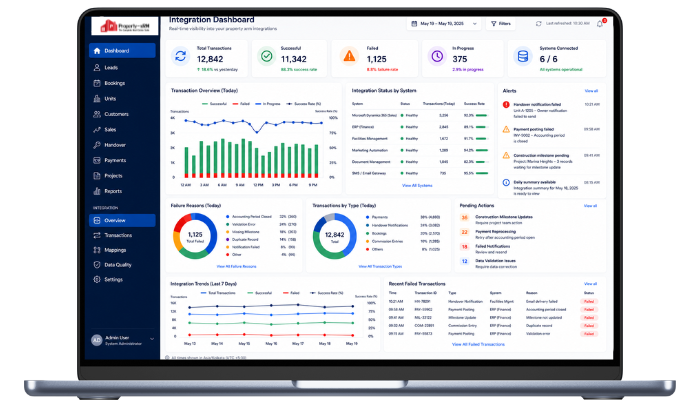
Integrations that fail silently are the most dangerous, and in real estate the cost is not always financial. A handover notification that fails to send is not just a missed email. It is a tenant whose unit has been ready for three weeks, who was never told, and who is now blaming the developer for a delay that was a notification that never left the queue. Users need visibility into the integration’s state at any point: how many transactions processed, how many failed, why, and what action is required.
- Email alerts to the relevant owner when individual records fail, such as a handover notification or a payment posting
- In-application notifications for operations teams responsible for resolving business-process blocking conditions like outstanding construction milestones
- End-of-day summaries showing transaction counts, failure rates, and pending actions, particularly important during an active launch week
- Dashboard views showing integration status trends, so a degrading pattern is visible before it becomes a launch-weekend crisis
Reconciliation
The reconciliation that matters most in real estate is comparing the total reserved unit value in the CRM against revenue recognised in the ERP. For off-plan sales, revenue recognition is typically tied to construction percentage complete, not the booking date.
Once a unit is reserved, the CRM records the booking amount received while the ERP begins recognising revenue progressively against construction milestones. The remaining instalments are structured across a payment plan, and as receipts arrive, they go through a distribution process that splits each receipt amount across specific invoices in the ERP. That gap between what the CRM shows as received and what the ERP has fully recognised is normal and expected. The reconciliation process exists to confirm it is the expected gap rather than a missed transaction, which is a distinction that matters enormously to a CFO reviewing the numbers at close.
Reconciliation should compare summary-level data at each financial close, then drive a record-level investigation only where the gap looks abnormal. Where the ERP month-end close depends on CRM data arriving correctly, reconciliation should be a formal step in the process, not an afterthought triggered by a finance team member noticing the numbers do not add up.
CRM Booking Value
CRM records the total reserved unit value and booking amount received.
ERP Recognized Revenue
ERP recognizes revenue progressively against construction milestones, not the booking date.
Compared at Financial Close
Summary-level figures are compared at close, confirming the gap is expected, not a missed transaction.
Scale and cost considerations
A 400-unit tower launch can generate several thousand CRM transactions, broker commission submissions, and payment postings inside a 48-hour Expression of Interest window. That is the volume spike that exposes a retry mechanism that was never load-tested, or a broker portal that holds up comfortably under fifty daily users but buckles under five hundred during a launch weekend. Integration costs are not just implementation costs. Where licensed platforms like Power Automate are used, flow consumption is metered per run, and failed transactions that trigger multiple retries still consume licensed capacity.
Integration planning should include an estimate of expected transaction volumes at peak, not average, and the cost implications of retries across the full contract period. A launch weekend is not the time to discover that the integration design was scoped for steady-state volume rather than a concentrated spike. ERP upgrades introduce additional cost: when a target ERP moves from on-premises to cloud, existing field mappings and integration logic must be redesigned, which is a partial re-implementation requiring coordinated effort from the integration team, the ERP team, and the business owners who validate the data flows.
Data Migration is the Integration nobody plans for
Every enterprise CRM implementation involves migrating data from what came before: legacy CRM, spreadsheets, a property management system, or some combination. The real estate-specific risk sits in the inventory hierarchy itself: project to property to unit, each level carrying its own attributes, plus years of payment plan history and broker commission ledgers that must map cleanly into the new structure. If that mapping is wrong, the sales team cannot trust a single number in the new system on day one.
The consequences surface at the worst possible moment. A sales team that opens the new CRM and cannot find a buyer’s payment history or discovers that a unit’s broker commission record did not migrate loses confidence in the system immediately. That confidence is very difficult to recover, and it is entirely preventable.
| Workstream | Common failure mode | What good looks like |
| Data audit | Vendor starts extraction before auditing source data quality across legacy CRM, spreadsheets, and broker records | Field-by-field mapping across all source systems before any migration script is written |
| Data cleansing | Duplicate buyer records and inconsistent unit naming imported as-is into the new system | Dedicated cleansing workstream: deduplication, standardisation, and gap-filling before migration |
| Dry-runs | First migration attempted in production during an active launch | Minimum three dry-runs in UAT with business owner sign-off before go-live |
| Relationship mapping | Years of payment plan history and broker commission ledgers do not map cleanly to the new inventory hierarchy | Project to building to floor to unit relationships, plus payment history, verified intact after migration |
| Data governance | No entry standards configured at go-live, so unit and customer data quality degrades within the first quarter | Validation rules and entry standards built into the system before the first user logs in |
| The most important principle in real estate data migration Migration must be treated as a business programme, not a technical task. The IT team can write migration scripts. Only the sales and finance teams can validate whether the migrated payment history and commission ledgers accurately represent the historical commercial record. That validation requires structured dry-runs and formal sign-off, not a quick review on go-live morning. |
Cross-team ownership
An integration owned by one team will not remain reliable when another team changes a system. Every integration point requires named ownership across the source-system team, the integration team, the target-system team, and the business stakeholders, including the project and construction teams whose milestone updates directly trigger payment postings. When a project team changes how construction percentage is reported, or finance changes the chart of accounts, the integration breaks unless that change is communicated to the team responsible for the connection.
Integration governance should be defined before go-live: who owns each integration point, who is notified when it fails, what the escalation path is, and how the integration is tested after any system upgrade on either side. These are not questions that can be answered after the first production incident, ideally not during the first month-end close of an active launch.
Conclusion: The pattern every launch produces
The CIOs and CTOs who regret their CRM integration decisions rarely chose the wrong platform. They underestimated what happens after go-live. The accounting period closes mid-launch and forty payment postings queue silently. A unit gets re-released after a failed booking and the CRM pushes a duplicate commission claim to the ERP. The construction percentage in the ERP lags the bookings in the CRM by a full reporting cycle, and nobody has confirmed that gap is expected rather than a missed transaction.
None of this is unforeseeable. It is the same pattern every launch produces, and it is preventable with the right design, the right monitoring, and the right ownership model in place before the first reservation is made. The question worth asking before you sign off on an integration scope is not whether the vendor can connect the systems. It is whether they have seen a 400-unit launch weekend before, and whether they can show you exactly what happens to the data when something breaks.
Talk to a team that has seen a 400-unit launch weekend before
100+ deployments. Monitoring, retry, reconciliation, and migration included by design, not bolted on after the first incident.
Related reading
FAQ
What are the two main types of integration failure in real estate CRM?
Implementation failures are caused by technical gaps such as an incorrect field mapping between the CRM and the facilities management system. The integration team owns the fix. Business-process failures occur when the target system is not ready to accept the data, for example a payment milestone tied to a construction percentage that has not yet been updated by the project team. The operations team owns the fix. Both must be anticipated in the integration design, with separate handling logic and notification paths for each.
What causes duplicate records in real estate CRM integration?
The most common cause is the normal lifecycle of a unit during an active launch: a reservation falls through, the unit is re-released, and a different buyer books it shortly after. Without unique identifier validation across the CRM and the ERP, this can generate two active payment plans for the same unit or duplicate broker commission claims. Prevention requires both systems to maintain unique identifiers for every transaction type and validate them before any record is pushed.
How should CRM-ERP reconciliation work for off-plan property sales?
Reconciliation should compare total reserved unit value in the CRM against revenue recognised in the ERP. For off-plan sales, revenue recognition is typically tied to construction percentage complete rather than the booking date, so a normal gap exists between what is reserved and what is recognised. The reconciliation process confirms that gap is expected rather than the result of a missed or failed transaction and should be a formal step in every financial close where the ERP depends on CRM data.

 Apr 19, 2022